
Build your SEO powerhouse in Claude Code
A step-by-step guide to connecting all the MCPs that power a complete SEO+GEO pipeline in Claude Code: Chrome (see the preview), Search Console (real data), keywords (Ubersuggest/Ahrefs), image generation, and WordPress publishing. Real configurations, exact commands—just copy and paste.
The concept: one brain, multiple arms
Claude Code is the brain. The MCPs (Model Context Protocol) are the arms: each one connects Claude to a real-world tool (your browser, Search Console, a keyword tool, your WordPress site). Once connected, Claude no longer just “talks” about SEO—he does it: he reads your actual data, writes content, previews it, and publishes it.
- MCP Chrome DevTools — Claude opens a browser and views the HTML rendering before publication
- MCP Search Console (via Windsor.ai) — Your Site's Actual Impressions, Rankings, and Clicks
- MCP Keywords (Ubersuggest / Ahrefs) — Search Volume, Difficulty, Intent
- MCP imagegen — generates images for articles
- WordPress Post — via the REST API (application password)
That's the core. In total, we connect 12 MCPs —the complete list is right below.
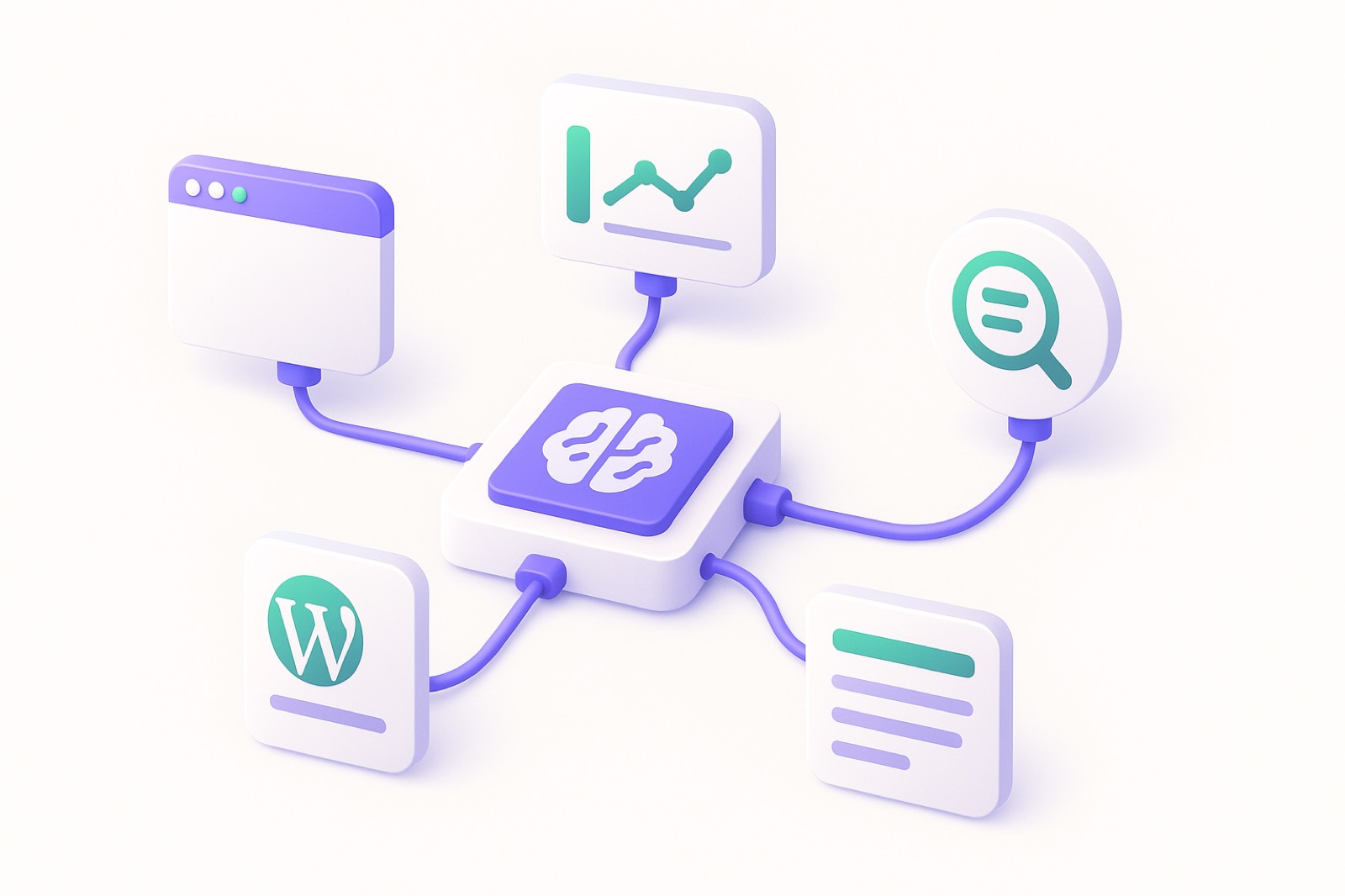
There are two types of MCPs: those that run locally (launched by npx, declared in a config file) and the claude.ai connectors (connected with a single click from the settings). We'll look at both.
The 12 SEO MCPs to Connect to Claude
You don’t need 10 SEO tools at €200 each per month. You needONE solid SEO infrastructure, connected to your actual data. Here are the 12 MCPs we connect for our clients—and how each one fits in.
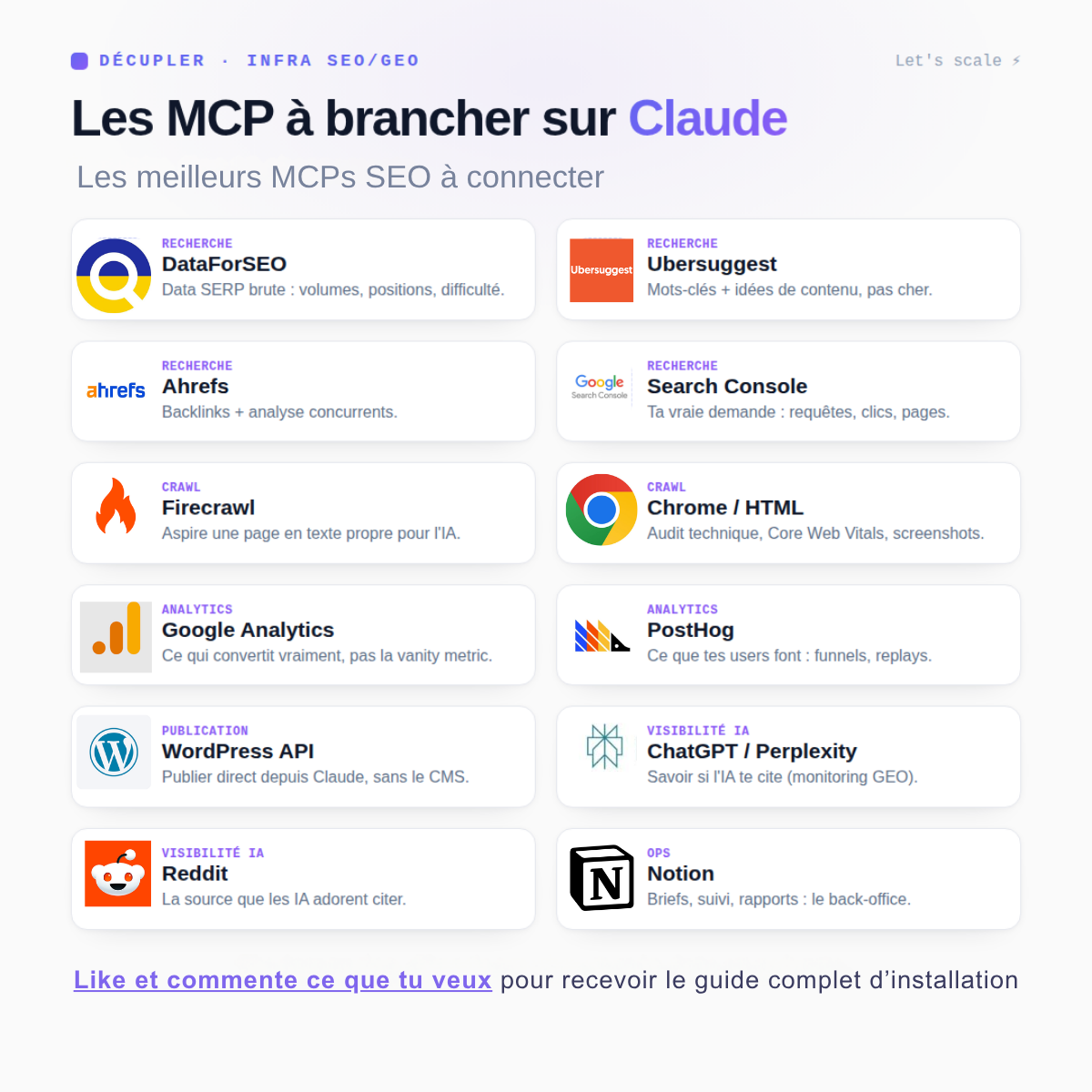
The basic idea: Claude Code is in charge. Surrounding it are MCPs (connectors) that give it access to the data. You ask, it fetches the data, and it executes the command. The step-by-step details are right below.
No need to set everything up all at once. Start with Search Console + a keyword tool + WordPress, then add the layers (crawl, analytics, AI visibility) as needed. One central hub, your real data, the best MCPs.
What you do with each MCP—and what you earn
The image shows you the roadmap. Here, MCP by MCP, arethe specific actions you take and the benefits you gain from them.
DataForSEO
Volumes, difficulty, positions, and real-time SERPs—for thousands of keywords at once, billed per query.
Unlimited data that replaces three licenses, with no monthly subscription.
.mcp.json file + your API credentials in .env (DATAFORSEO_LOGIN, DATAFORSEO_PASSWORD).
Give me the volume, difficulty, and top 10 results for "GEO Paris Agency" in the French market.
Ubersuggest
Keyword expansion, Google suggestions, content ideas, SERP analysis.
A prioritized backlog of articles without a license for €200 per month.
Native connector: Settings → Connectors → Authorize using your Ubersuggest account. Nothing to install, nothing to configure.
List 50 keywords related to “generative engine optimization,” including search volume and difficulty, for the French market.
Ahrefs
Backlinks, referring domains, anchor text, and the pages that actually rank among your competitors.
You see why they're going ahead—it's not just that they're going ahead.
Ahrefs API key (API plan required) declared in .mcp.json. Don't have API access? DataForSEO covers most of your backlink needs.
Compare my backlink profile to that of [competitor] and list the 20 domains that they have but I don't.
Search Console
Impressions, clicks, average position, and actual search queries—page by page, for any time period you choose.
Stop guessing: this is the only source that tells you what Google actually gives you.
Two options: a connector (Windsor.ai, no code), or a Google service account with ` GSC_CREDENTIALS_JSON ` in `.env ` for a local script.
List my pages ranked 8th through 15th over the last 28 days, sorted by impressions.
Firecrawl
Scrape any page into clean Markdown—including those rendered with JavaScript.
Claude actually reads the top three results on the SERP before writing, instead of just guessing what they contain.
npx -y firecrawl-mcp in .mcp.json, with FIRECRAWL_API_KEY.
Scrape the first 3 results for “SEO audit” and tell me which sections they cover that I don’t have.
Chrome / HTML
Claude opens a real browser, loads your page, checks how it looks, measures the Core Web Vitals, and takes a screenshot.
Never again will an article be published with a broken block—it checks it before you do.
claude mcp add chrome-devtools — npx -y chrome-devtools-mcp@latest –isolated
Open this preview URL, check that all the images load, and show me the Core Web Vitals.
Google Analytics
Sessions, conversions, entry pages, and behavior by channel.
You're finally linking SEO to revenue, not just to search rankings.
GA4 connector (native or via Windsor.ai), OAuth authorization on your property. Read-only.
Which organic landing pages generated the most conversions last month?
PostHog
Session replays, funnels, and custom events on your SEO pages.
You can see where readers lose interest in the article—SEO doesn't end with the click.
PostHog project API key in .mcp.json. It points to the website project, not the app.
Of the organic visitors to this page, at what point do they drop off before reaching the form?
WordPress API
Create, update, and publish posts and pages—title, slug, excerpt, media, and status.
No copying and pasting: The article goes from the editor to the WordPress draft with a single command.
WordPress app password (revocable) + WP_SITE_URL, WP_USER, WP_APP_PASSWORD in .env.
Publish this HTML as a draft on WordPress, as a page, keeping the existing slug.
ChatGPT / Perplexity
Run your target queries through AI search engines and note who is mentioned, in what order, and with what sources.
Measuring Your GEO Market Share: The SERP Is No Longer the Only Playing Field.
Perplexity API key in .mcp.json. Responses are logged for month-over-month comparison.
Perplexity’s “Best GEO Paris Agency” ranking: Who is listed, and where do I rank?
Trace the threads back to where your target asks their real questions, using their exact wording.
AI engines rely heavily on Reddit: being mentioned there means being mentioned by them.
Reddit read-only API (app registered on your account), or using Firecrawl to access the pinned threads.
Find the 10 most recent Reddit threads asking how to choose an SEO agency.
Concept
Reads and writes your editorial framework: briefs, keywords, status updates, schedule, and approvals.
The machine has a memory—what has been done, what remains, and who approved what.
Native connector: One click, and then you authorize only the relevant databases.
Create a row in the "SEO Mapping" database for each keyword we just validated.
Install Claude Code
Two ways to get started. The easiest: the Claude app (Mac, Windows, or the web at claude.ai/code)—just open your project and connect the connectors with a few clicks, without touching the terminal. Or use the command line (below), which is more flexible for MCPs running locally.
If you haven't already, install Claude Code (Node.js required), then run it from your project folder.
# Installation (one-time)
npm install -g @anthropic-ai/claude-code
# Run in your project
cd my-project
claude
MCPs are declared either in an .mcp.json file at the root of the project or using the ` claude mcp add` command. Both methods are used below.
MCP Chrome DevTools
The most important thing for quality: Claude opens a real browser, loads the page, and checks how it renders (screenshot + accessibility tree). No more “blind publishing”—we check the HTML before going live.
{
  "mcpServers": {
    "chrome-devtools": {
      "command": "npx",
      "args": ["-y", "chrome-devtools-mcp@latest", "--viewport", "1440x900", "--isolated"]
    }
  }
}
Equivalent in a single order:
claude mcp add chrome-devtools -- npx -y chrome-devtools-mcp@latest --isolated
Check: In Claude, ask, “Open this page and take a screenshot”—if it sends you a screenshot, it’s connected.
MCP imagegen
To ensure that each article is published with its images, we connect a generator (in this case, OpenAI's gpt-image-1 ). You'll need an OpenAI API key.
{
  "mcpServers": {
    "imagegen": {
      "command": "npx",
      "args": ["-y", "imagegen-mcp", "--models", "gpt-image-1"],
      "env": { "OPENAI_API_KEY": "sk-…ta-clé…" }
    }
  }
}
Never commit your key. Store it in an environment variable or in a file that Git ignores.
Search Console via Windsor.ai
To make data-driven decisions (impressions, positions, clicks), connect Google Search Console. The easiest way is to use the Windsor.ai connector, which integrates GSC (and over 300 other sources) into MCP on the claude.ai side.
📌 Login (on the claude.ai side)
- Go toclaude.ai/customize/connectors
- Add Windsor.ai and authorize it
- In Windsor, connect the Search Console source and select your site's property
- In Claude, retrieve the queries from the last 90 days (fields: query, clicks, impressions, CTR, position, page)
Claude then retrieves the raw data, which you process into a query to identify the quick wins (pages ranked 5–20 that can move up to page 1):
python3 scripts/gsc_normalize.py \
  --in .cache/gsc-raw.json \
  --out .cache/gsc.json
Ubersuggest or Ahrefs
For search volume, difficulty, and intent, you can connect a keyword tool to MCP. Both Ubersuggest and Ahrefs offer a connector—the same connection process as Windsor.
📌 Connection
- Add the connector (Ubersuggest or Ahrefs) in Settings → Connectors, or specify its MCP server in .mcp.json if it's running locally
- Check authentication (account + tier) before starting
- Ask Claude: Suggestions for keywords, search volumes, and difficulty levels for your topics (French market)
Goal: Not 500 keywords in a spreadsheet, but a short list prioritized by commercial intent and feasibility. (Turning this into a complete editorial plan is coveredin another guide.)
WordPress Publishing (REST API)
You can publish directly to WordPress via its REST API using an app password (which can be revoked without exposing your real password). Create it in WordPress: Users → Profile → App Passwords.
# Never committed
WP_SITE_URL=https://ton-site.com
WP_USER=your-username
WP_APP_PASSWORD=xxxx xxxx xxxx xxxx xxxx xxxx
A small script posts the content (article or page), which is saved as a draft by default for proofreading:
python3 scripts/wp_publish.py --type post \
  --title "My Title" --slug my-title \
  --content-file article.html --status draft
Images are also uploaded via the API (/wp-json/wp/v2/media)—Claude generates them, compresses them, uploads them, and then inserts the URL into the content.
Skills: Solidify Your Methods
A “Skill” is a written method that Claude follows exactly the same way every time (role + rules + format). This is what makes production consistent and scalable. Each step in the pipeline has its own: keyword research, expert writing, lead magnet…
---
name: expert-writing
description: Writes an in-depth, well-sourced SEO+GEO article.
---
# Rules
1. Research BEFORE writing (data, SERPs, sources)
2. Each paragraph = one piece of data / one example / one method
3. Go into the technical “how,” not the “what”
4. Publish as a draft; never make up numbers
En Claude Code, un dossier ~/.claude/skills/<nom>/SKILL.md est auto-découvert. Tu invoques ensuite le skill par son nom.
Monitoring & Reporting
The loop is completed with monitoring. The MCP Search Console continuously updates a dashboard: what’s rising, what’s stagnating, and where to reinvest. A monthly report is generated automatically, and keyword rankings are tracked via the MCP Keywords tool.
- Positions & Impressions: GSC in Real Time (Windsor)
- Tracking target keywords: Ubersuggest / Ahrefs
- Monthly report: generated and formatted automatically
How It All Fits Together
Writing (skill)→
Rendering (Chrome)→
Images (imagegen)→
Publish (WP)→
Tracking (GSC)
Each step feeds into the next: GSC data reveals quick wins, keywords inform expert writing, Claude previews the final result before publishing, WordPress receives the linked and illustrated article, and GSC measures the results—which kickstarts the cycle all over again. One brain, one loop.
The 5 Combinations That Change Everything
An MCP on its own is just another tool. The real power comes from the chains: three or four MCPs calling each other within a single prompt, each passing its result on to the next. That’s when the work stops being manual—no more exporting, no more copying and pasting, no more open tabs “just to check.”
Here are the five channels we use most often, along with the exact prompt and what happens behind the scenes.
01CatchingUp on Quick Wins
Take my pages ranked 8 through 15 over the last 28 days.
For the 5 with the most impressions: find out what the top 3
cover that I don't, write the missing sections,
and update the draft page.
- Search Console — extracts queries ranked 8–15, aggregates by URL, and sorts by impressions.
- DataForSEO — retrieves the actual top 3 results from the SERP for the main search query of each URL.
- Firecrawl — scrapes these competitor pages and extracts their Hn structure and processed entities.
- Claude — Compare it to your page, make a list of the gaps, and write only what's missing.
- WordPress API — updates the existing page to draft status — slug and URL remain unchanged.
5 optimized pages, in draft form, ready for proofreading. This is the combo that pays off the fastest: you’re working on pages that have already generated impressions, so every ranking gain is immediately visible.
02TheBrief That Doesn't Break New Ground
Create the brief for “GEO Paris Agency”: keyword expansion,
primary intent, what the top 5 results cover, the H1 structure that outperforms them,
and add it to the Notion database with the status “To be written.”
- Ubersuggest — semantic expansion, search volumes, Google suggestions, related questions.
- DataForSEO — Live SERP: Top Search Intent, Formats That Rank, AI Overview.
- Firecrawl — scrapes the top 5 results and extracts the Hn outlines, lengths, and topics covered.
- Claude —constructs the plane that contains the union of the 5— plus the angle that none of them takes.
- Concept — creates the entry: brief, keywords, status, target date.
A brief based on the actual SERP, not on a model's recollections. No one opened a single tab.
03The articlewas reviewed before publication
Write the article for the “X” concept brief using the expert-writing skill,
generate the visuals for the specified locations, publish as a draft,
then open the preview in Chrome and check how it looks.
- Concept — reviews the approved brief and its constraints.
- Expert Writing Skill — Stick to your method: research before writing, one piece of information per paragraph, and mandatory internal linking.
- imagegen — generates visuals for the locations specified in the brief.
- WordPress API — Publish as a draft, with a title, excerpt, and media.
- Chrome DevTools — opens the preview, checks that the images are loading and that no blocks are broken, and takes a screenshot.
A draft that’s been proofread by a machine before you proofread it. Step 5 is the one everyone skips—it’s precisely the step that prevents you from discovering a broken block a week after it goes live.
04TheAI Visibility Score
Submit my 20 target search queries to Perplexity, identify which sites are cited,
compare them to my Google rankings for the same queries,
and log everything in Notion.
- Perplexity — queries the 20 search terms and collects the results along with their cited sources.
- Claude — counts citations by field and calculates your share of the voice.
- Reddit —identifies the threads that feed these responses—AI engines rely heavily on them.
- Search Console — shows you your actual Google ranking for the same search queries.
- Concept — records the statement for month-over-month comparison.
A table like“3rd on Google, invisible on Perplexity.” The gap between the two columns is your GEO roadmap.
05TheMonthly Report That Writes Itself
Put together the monthly report: Search Console vs. M-1 trends,
GA4 organic conversions, PostHog drop-off points,
and write it up in Notion.
- Search Console — impressions, clicks, and rankings (M vs. M-1); identifies the winners and losers.
- Google Analytics — Organic Sessions and Conversions by Landing Page.
- PostHog — where organic visitors drop off along the journey.
- Claude — check all three — not “traffic is increasing,” but “traffic is increasing on pages that don’t convert.”
- Notion — publishes the report, which is dated and comparable to the previous one.
Reporting that used to take half a day. And most importantly: a report that actually says something instead of just listing charts.
What does it look like in the terminal?
Here’s how ComboNo.1 actually plays out. A sentence is entered; Claude selects his tools, calls them up in order, and produces an output. None of these steps is controlled manually.
> Take my pages ranked 8th through 15th and optimize the top 3.

⏺ Search Console · 28-day search queries
  └ 1,284 queries analyzed · 47 URLs ranked 8th–15th

⏺ DataForSEO · Live SERP (×3)
  └ Top 3 results retrieved for “SEO audit,” “technical audit,” “website audit”

⏺ Firecrawl · Crawl (×9)
  └ 9 competitor pages · Hn sitemaps extracted

⏺ Analysis
  └ /se-audit/: 6 missing sections (including “how much does it cost,” “timelines”)
  └ /technical-audit/: 4 missing sections
  └ /site-audit/: 3 missing sections

⏺ Copywriting · missing sections only
  └ 13 sections · internal links added to 5 pages

⏺ WordPress · wp_publish.py --id 4812 --status draft
  └ ✅ draft updated · slug unchanged

Done — 3 pages enhanced, waiting for you to review them.
Here’s the shift: you’re no longer asking for a tool (“open Search Console”), you’re asking for a result (“improve my pages ranked 8–15”). It’s Claude who decides which MCPs to call, in what order, and what to do with their responses.
How this changes things, in hours
The benefit isn't that "Claude writes faster." The benefit is that data collection, cross-checking, and uploading are eliminated. All that's left are the two things that truly require a human brain: deciding what to focus on, and validating the output.
| Task | By hand | Trendy |
|---|---|---|
| Find This Month's Quick Wins GSC export, spreadsheet, filters, manual cross-checking |
≈ 2 h | 1 prompt · 6 min |
| Brief: Ranked in the top 5 of the SERP 5 tabs open, reviewing Hn tags one by one |
≈ 1 hour 30 minutes | 1 prompt · 4 min |
| Article + visuals + publishing Writing, image library, copy-and-paste into WP |
≈ 4 h | 1 prompt · 9 min |
| Measuring Your Visibility in LLMs Queries entered one by one, manually recorded |
≈ 2 h | 1 prompt · 5 min |
| Monthly Report GSC + GA4 Exports, Formatting, Comments |
≈ 3 h | 1 prompt · 3 min |
| The entire month | ≈ 12:30 p.m. | ≈ 27 min |
These are rough estimates based on our own processes for a site with about 100 pages. Your figures will vary depending on the volume and the number of connected MCPs.
This time saved isn't used to publish 10 times as much. It's used to publish better: more research upfront, more proofreading afterward. A machine that churns out a large volume of shallow content simply produces shallow content faster.
Once you're connected, you no longer have to do SEO "by hand"
The infrastructure doesn't "explain" SEO—it runs it on your actual data. Once the MCPs are in place, you can simply ask Claude:
- "Find my Search Console quick wins (positions 5–20) and sort them by traffic potential"
- "Write an article about [keyword], with links to my existing pages, and show me a preview before publishing."
- "Am I mentioned by ChatGPT / Perplexity in my 10 target prompts? If not, why not?"
- "Check this page's speed and Core Web Vitals, and fix any blocking issues"
- "Publish this draft in WordPress, including the generated and compressed images"
- "Generate the monthly report: what's rising, what's stagnating, and where to reinvest"
There are three ways to connect an MCP—you can choose whichever one works best for your stack:
| Method | How | Examples | When |
|---|---|---|---|
| claude.ai Connector | 1 click in Settings → Connectors | Ubersuggest, Notion, Windsor.ai (GSC, GA…) | The easiest way, without a terminal |
| .mcp.json (local) | npx declared in the project | Chrome DevTools, Firecrawl, imagegen | Technical tools, on-site |
| API / key | API key or application password | DataForSEO, Ahrefs, WordPress, PostHog | Direct access to a service |
To learn more — Décupler guides and offers that are built on this infrastructure:
Frequently Asked Questions
Do you need to know how to code?
No, but being comfortable with a terminal helps. MCPs are connected via copy-and-paste (a file .mcp.json or a few commands), and the claude.ai connectors can be linked with a single click. Claude takes care of the rest.
What exactly is an MCP?
The Model Context Protocol is a standard that connects a model (Claude) to external tools. Each MCP gives Claude a specific capability: opening a browser, viewing Search Console, publishing to WordPress, or generating an image.
Does it work with Ahrefs instead of Ubersuggest?
Yes. The process is the same: you plug in the keyword connector of your choice. Both Ubersuggest and Ahrefs provide access that can be used in MCP.
What if I'm not using WordPress?
Publishing is done through an API: WordPress uses its REST API today, and the same principle applies to other CMSs that provide an API or a dedicated admin panel.
Your competitors are mentioned by the AI.
You, however, are not mentioned.
Take 30 minutes: I'll show you the 10 prompts where you don't appear, and the 3 quick wins to get you in there.
Free · No obligation